Use Code Components in Power Pages
Using code components in Power Pages sites
MCP get_skill({ skillId: "use-code-components-in-power-pages-5918a722" })Use this skill with your agent
Create a free account and connect via MCP
# Use Code Components in Power Pages Power Pages now support controls built for model-driven apps created using Power Apps component framework. To use code components in Power Pages site webpages: 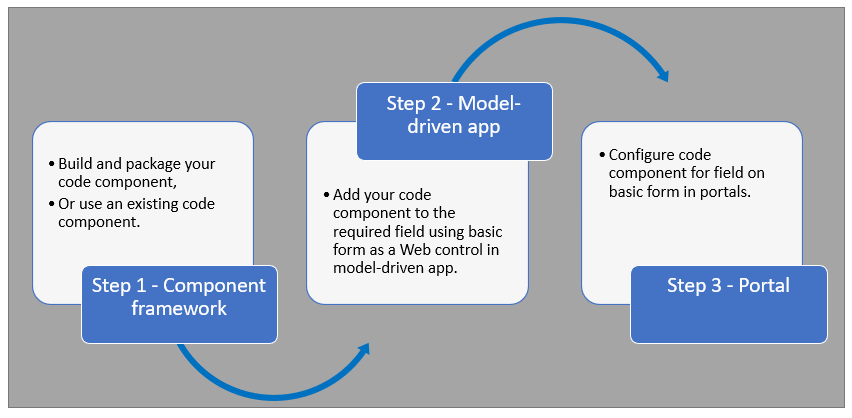 After completing these steps, users can interact with the code component using the webpage that has the respective [form](https://learn.microsoft.com/en-us/power-pages/getting-started/add-form) component. ## Prerequisites - You need system administrator privileges to enable the code component feature in the environment - Your Power Pages site version needs to be [9.3.3.x](https://learn.microsoft.com/en-us/power-apps/maker/portals/versions/version-9.3.3.x) or higher - Your starter site package needs to be [9.2.2103.x](https://learn.microsoft.com/en-us/power-apps/maker/portals/versions/package-version-9.2.2103) or higher ## Create and Package Code Component To learn about creating and packaging code components in Power Apps component framework, go to [Create your first component](https://learn.microsoft.com/en-us/power-apps/developer/component-framework/implementing-controls-using-typescript). ### Supported Field Types and Formats Power Pages supports restricted field types and formats for using code components. The following table lists all supported field data types and formats: **Supported Types:** - Currency - DateAndTime.DateAndTime - DateAndTime.DateOnly - Decimal - Enum - Floating Point Number - Multiple - OptionSet - SingleLine.Email - SingleLine.Phone - SingleLine.Text - SingleLine.TextArea - SingleLine.Ticker - SingleLine.URL - TwoOptions - Whole For more information, see [Attributes list and descriptions](https://learn.microsoft.com/en-us/power-apps/developer/component-framework/manifest-schema-reference/property#remarks). ### Unsupported Code Components in Power Pages The following code component APIs aren't supported: - [Device.captureAudio](https://learn.microsoft.com/en-us/power-apps/developer/component-framework/reference/device/captureaudio) - [Device.captureImage](https://learn.microsoft.com/en-us/power-apps/developer/component-framework/reference/device/captureimage) - [Device.captureVideo](https://learn.microsoft.com/en-us/power-apps/developer/component-framework/reference/device/capturevideo) - [Device.getBarcodeValue](https://learn.microsoft.com/en-us/power-apps/developer/component-framework/reference/device/getbarcodevalue) - [Device.getCurrentPosition](https://learn.microsoft.com/en-us/power-apps/developer/component-framework/reference/device/getcurrentposition) - [Device.pickFile](https://learn.microsoft.com/en-us/power-apps/developer/component-framework/reference/device/pickfile) - [Utility](https://learn.microsoft.com/en-us/power-apps/developer/component-framework/reference/utility) **Additional Restrictions:** - The [uses-feature](https://learn.microsoft.com/en-us/power-apps/developer/component-framework/manifest-schema-reference/uses-feature) element must not be set to true - [Value elements not supported](https://learn.microsoft.com/en-us/power-apps/developer/component-framework/manifest-schema-reference/property#value-elements-that-are-not-supported) by Power Apps component framework - Power Apps Component Framework (PCF) controls bound to multiple fields in a form isn't supported ## Add a Code Component to a Field in a Model-Driven App To learn how to add a code component to a field in a model-driven app, go to [Add a code component to a field](https://learn.microsoft.com/en-us/power-apps/developer/component-framework/add-custom-controls-to-a-field-or-entity#add-a-code-component-to-a-column). > **Important**: Code components for Power Pages are available for web browsers using the client option of **Web**. ### Add Using Data Workspace You can also add a code component to a form using [Data workspace](https://learn.microsoft.com/en-us/power-pages/configure/data-workspace-forms). 1. When editing a Dataverse form in the Data workspace form designer, select a field 2. Choose **+ Component** and select an appropriate component for the field 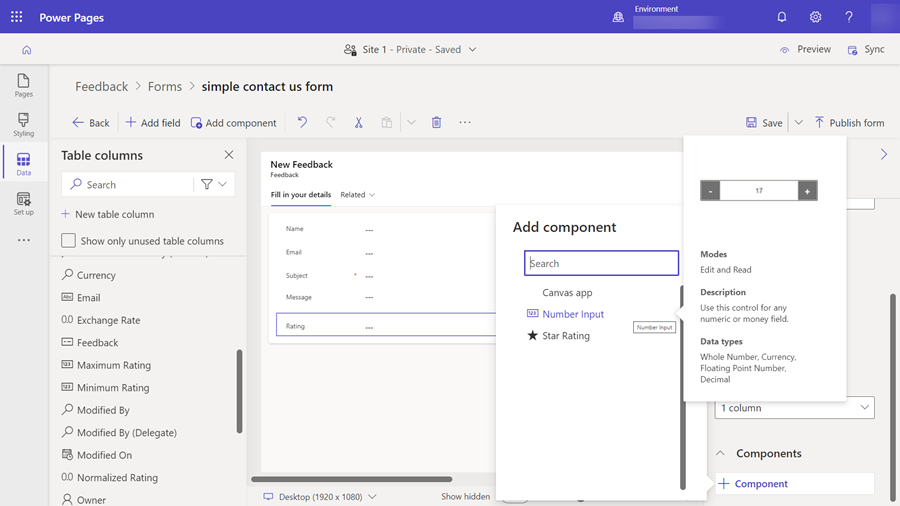 3. Select **Save** and **Publish form** ## Configure Power Pages Site for Code Component After the code component is added to a field in a model-driven app, you can configure Power Pages to use the code component on a form. There are two methods to enable the code component: ### Enable Code Component in Design Studio To enable a code component on a form using the design studio: 1. After you [add the form to a page](https://learn.microsoft.com/en-us/power-pages/getting-started/add-form), select the field where you added the code component and select **Edit field** 2. Select the **Enable custom component** field 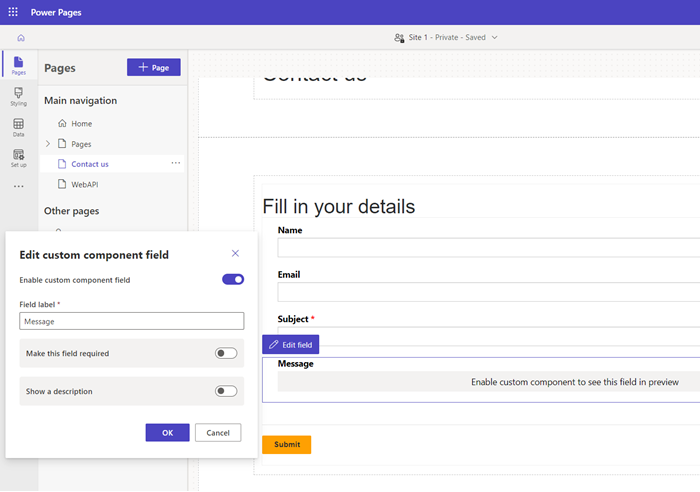 3. When you preview the site, you should see the custom component enabled ### Enable Code Component in Portals Management App To add a code component to a basic form by using the Portals Management app: 1. Open the [Portals Management](https://learn.microsoft.com/en-us/power-pages/configure/portal-management-app) app 2. On the left pane, select **Basic Forms** 3. Select the form to which you want to add the code component 4. Select **Related** 5. Select **Basic Form Metadata** 6. Select **New Basic Form Metadata** 7. Select **Type** as **Attribute** 8. Select **Attribute Logical Name** 9. Enter **Label** 10. For **Control Style**, select **Code Component** 11. Save and close the form ## Code Components Using the Portal Web API A code component can be built and added to a webpage that can use the [portal Web API](https://learn.microsoft.com/en-us/power-pages/configure/web-api-overview) to perform create, retrieve, update, and delete actions. This feature allows greater customization options when developing portal solutions. For more information, see [Implement a sample portal Web API component](https://learn.microsoft.com/en-us/power-pages/configure/implement-webapi-component). ## Next Steps [Tutorial: Use code components in portals](https://learn.microsoft.com/en-us/power-pages/configure/component-framework-tutorial) ## See Also - [Power Apps component framework overview](https://learn.microsoft.com/en-us/power-apps/developer/component-framework/overview) - [Create your first component](https://learn.microsoft.com/en-us/power-apps/developer/component-framework/implementing-controls-using-typescript) - [Add code components to a column or table in model-driven apps](https://learn.microsoft.com/en-us/power-apps/developer/component-framework/add-custom-controls-to-a-field-or-entity)
Related Skills
More skills in Business, Marketing & Sales
Ab Testing
When the user wants to plan, design, or implement an A/B test or experiment, or build a growth experimentation program. Also use when the user mentions "A/B test," "split test," "experiment," "test this change," "variant copy," "multivariate test," "hypothesis," "should I test this," "which version is better," "test two versions," "statistical significance," "how long should I run this test," "growth experiments," "experiment velocity," "experiment backlog," "ICE score," "experimentation program," or "experiment playbook." Use this whenever someone is comparing two approaches and wants to measure which performs better, or when they want to build a systematic experimentation practice. For tracking implementation, see analytics. For page-level conversion optimization, see cro.
Ab Test Setup
When the user wants to plan, design, or implement an A/B test or experiment. Also use when the user mentions "A/B test," "split test," "experiment," "test this change," "variant copy," "multivariate test," "hypothesis," "conversion experiment," "statistical significance," or "test this." For tracking implementation, see analytics-tracking.
Ab Test Setup
Ab Test Setup linked from Corey Haines marketing skills, with the upstream skill instructions available on GitHub.
Ab Test Store Listing
When the user wants to A/B test App Store product page elements to improve conversion rate. Also use when the user mentions "A/B test", "product page optimization", "test my screenshots", "test my icon", "conversion rate optimization", "CPP", or "custom product pages". For screenshot design, see screenshot-optimization. For metadata optimization, see metadata-optimization.
Account Research
Research a company or person and get actionable sales intel. Works standalone with web search, supercharged when you connect enrichment tools or your CRM. Trigger with "research [company]", "look up [person]", "intel on [prospect]", "who is [name] at [company]", or "tell me about [company]".
Account Research
Research a company using Common Room data. Triggers on 'research [company]', 'tell me about [domain]', 'pull up signals for [account]', 'what's going on with [company]', or any account-level question.
Explore Other Categories
Skills from other categories with shared topics
Power Platform MCP Integration Expert
Expert in Power Platform custom connector development with MCP integration for Copilot Studio - comprehensive knowledge of schemas, protocols, and integration patterns
Dataverse SDK for Python - Pandas Integration Guide
Guide to integrating the Dataverse SDK for Python with pandas DataFrames for data science and analysis workflows. The SDK's JSON response format maps seamlessly to pandas DataFrames, enabling data scientists to work with Dataverse data using familiar data manipulation tools.
Dataverse SDK for Python — Getting Started
- Install the Dataverse Python SDK and prerequisites. - Configure environment variables for Dataverse tenant, client ID, secret, and resource URL. - Use the SDK to authenticate via OAuth and perform CRUD operations.