Dependent Libraries (Preview)
Using dependent libraries in PCF components
MCP get_skill({ skillId: "dependent-libraries-preview-63a0f570" })Use this skill with your agent
Create a free account and connect via MCP
# Dependent Libraries (Preview)
[This topic is pre-release documentation and is subject to change.]
With model-driven apps, you can reuse a prebuilt library contained in another component that is loaded as a dependency to more than one component.
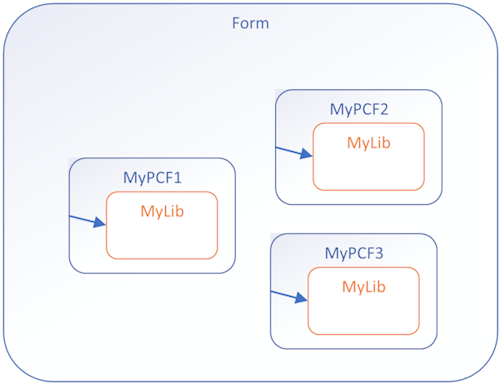
Having copies of a prebuilt library in multiple controls is undesirable. Reusing existing libraries improves performance, especially when the library is large, by reducing the load time for all components that use the library. Library reuse also helps reduce the maintenance overhead in build processes.
## Before and After
**Before**: Custom library files contained in each PCF component
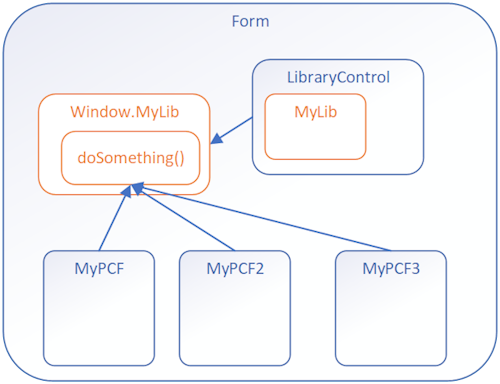
**After**: Components calling a shared function from a Library Control
## Implementation Steps
To use dependent libraries, you need to:
1. Create a **Library component** that contains the library. This component can provide some functionality or only be a container for the library.
2. Configure another component to depend on the library loaded by the library component.
By default, the library loads when the dependent component loads, but you can configure it to load on demand.
This way you can independently maintain the library in the Library Control and the dependent controls don't need to have a copy of the library bundled with them.
## How It Works
You need to add configuration data to your component project so that the build process deploys your libraries the way you want. Set this configuration data by adding or editing the following files:
- **featureconfig.json**
- **webpack.config.js**
- Edit the manifest schema to **Register dependencies**
### featureconfig.json
Add this file to override the default feature flags for a component without modifying the files generated in the `node_modules` folder.
**Feature Flags:**
| Flag | Description |
|------|-------------|
| `pcfResourceDependency` | Enables the component to use a library resource. |
| `pcfAllowCustomWebpack` | Enables the component to use a custom web pack. This feature must be enabled for components that define a library resource. |
By default, these values are `off`. Set them to `on` to override the default.
**Example 1:**
```json
{
"pcfAllowCustomWebpack": "on"
}
```
**Example 2:**
```json
{
"pcfResourceDependency": "on",
"pcfAllowCustomWebpack": "off"
}
```
### webpack.config.js
The build process for components uses [Webpack](https://webpack.js.org/) to bundle the code and dependencies into a deployable asset. To exclude your libraries from this bundling, add a `webpack.config.js` file to the project root folder that specifies the alias of the library as `externals`. [Learn more about the Webpack externals configuration option](https://webpack.js.org/configuration/externals/)
This file might look like the following when the library alias is `myLib`:
```javascript
/* eslint-disable */
"use strict";
module.exports = {
externals: {
"myLib": "myLib"
},
}
```
### Register Dependencies
Use the [dependency element](https://learn.microsoft.com/en-us/power-apps/developer/component-framework/manifest-schema-reference/dependency) within [resources](https://learn.microsoft.com/en-us/power-apps/developer/component-framework/manifest-schema-reference/resources) of the manifest schema.
```xml
<resources>
<dependency
type="control"
name="samples_SampleNS.SampleStubLibraryPCF"
order="1"
/>
<code path="index.ts" order="2" />
</resources>
```
### Dependency as On-Demand Load of a Component
Rather than loading the dependent library when a component loads, you can load the dependent library on demand. Loading on demand provides the flexibility for more complex controls to only load dependencies when they're required, especially if the dependent libraries are large.
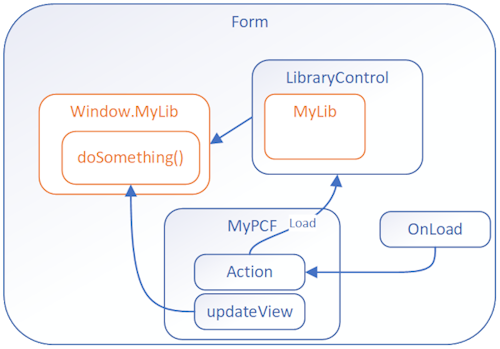
To enable on demand loading, you need to:
**Step 1**: Add these [platform-action element](https://learn.microsoft.com/en-us/power-apps/developer/component-framework/manifest-schema-reference/platform-action), [feature-usage element](https://learn.microsoft.com/en-us/power-apps/developer/component-framework/manifest-schema-reference/feature-usage), and [uses-feature element](https://learn.microsoft.com/en-us/power-apps/developer/component-framework/manifest-schema-reference/uses-feature) child elements to the [control element](https://learn.microsoft.com/en-us/power-apps/developer/component-framework/manifest-schema-reference/control):
```xml
<platform-action action-type="afterPageLoad" />
<feature-usage>
<uses-feature name="Utility"
required="true" />
</feature-usage>
```
**Step 2**: Set the `load-type` attribute of the [dependency element](https://learn.microsoft.com/en-us/power-apps/developer/component-framework/manifest-schema-reference/dependency) to `onDemand`.
```xml
<dependency type="control"
name="samples_SampleNamespace.StubLibrary"
load-type="onDemand" />
```
## Next Steps
Try a tutorial that walks you through creating a dependent library:
[Tutorial: Use dependent libraries in a component](https://learn.microsoft.com/en-us/power-apps/developer/component-framework/tutorial-use-dependent-libraries)Related Skills
More skills in Software Engineering
Accessibility Standards
Comprehensive web accessibility standards based on WCAG 2.2 AA, with 38+ anti-patterns, legal enforcement context (EAA, ADA Title II), WAI-ARIA patterns, and framework-specific fixes for modern web frameworks and libraries.
Accord
Authoring unified specification packages across Business/Development/Design teams via staged elaboration (L0 Vision → L1 Requirements → L2 Team Detail → L3 Acceptance Criteria). No code. Use when authoring cross-team specs, building L0-L3 packages, or aligning Biz/Dev/Design on a single source of truth.
Acquire Codebase Knowledge
Use this skill when the user explicitly asks to map, document, or onboard into an existing codebase. Trigger for prompts like "map this codebase", "document this architecture", "onboard me to this repo", or "create codebase docs". Do not trigger for routine feature implementation, bug fixes, or narrow code edits unless the user asks for repository-level discovery.
Acreadiness Assess
Run the AgentRC readiness assessment on the current repository and produce a static HTML dashboard at reports/index.html. Wraps `npx github:microsoft/agentrc readiness` and hands off rendering to the @ai-readiness-reporter custom agent. Supports policies (--policy) for org-specific scoring. Use when asked to assess, audit, or score the AI readiness of a repo.
Acreadiness Generate Instructions
Generate tailored AI agent instruction files via AgentRC instructions command. Produces .github/copilot-instructions.md (default, recommended for Copilot in VS Code) plus optional per-area .instructions.md files with applyTo globs for monorepos. Use after running /acreadiness-assess to close gaps in the AI Tooling pillar.
Acreadiness Policy
Help the user pick, write, or apply an AgentRC policy. Policies customise readiness scoring by disabling irrelevant checks, overriding impact/level, setting pass-rate thresholds, or chaining org baselines with team overrides. Use when the user asks about strict mode, AI-only scoring, custom weights, CI gating, or wants org-wide standardisation.
Explore Other Categories
Skills from other categories with shared topics
Arduino Azure IoT Edge Integration
Design and implement Arduino integration with Azure IoT Hub and IoT Edge, including secure provisioning, resilient telemetry, command handling, and production guardrails.
Arm Migration Agent
Arm Cloud Migration Assistant accelerates moving x86 workloads to Arm infrastructure. It scans the repository for architecture assumptions, portability issues, container base image and dependency incompatibilities, and recommends Arm-optimized changes. It can drive multi-arch container builds, validate performance, and guide optimization, enabling smooth cross-platform deployment directly inside GitHub.
AWS AppSync Event API Instructions
Production-grade guidance for AWS AppSync Event API handlers using APPSYNC_JS runtime restrictions, utilities, modules, and datasource patterns